Storage Chest: Difference between revisions
MirkLurkBot (talk | contribs) repo-sync: f0d3392ab48e text:9c3d4b85ce405734553d525968102d8e |
MirkLurkBot (talk | contribs) repo-sync: 2807897a9460 text:0b32e403ee988765c138d6c3397d6d68 |
||
| (4 intermediate revisions by the same user not shown) | |||
| Line 1: | Line 1: | ||
[[Main Page]] | [[Items]] | [[Main Page]] | [[Items]] | ||
'''<nowiki>Storage Chest</nowiki>''': camping and construction gear that can be bought. | |||
<span id=" | <span id="image"></span> | ||
<div class="pixel-art-figure" role="group" tabindex="0" aria-label="Storage Chest inventory icon. (scroll horizontally)" style="max-width:100%;overflow-x:auto;"> | <div class="pixel-art-figure" role="group" tabindex="0" aria-label="Storage Chest inventory icon. (scroll horizontally)" style="max-width:100%;overflow-x:auto;"> | ||
<span class="pixel-art" style="display:inline-block;line-height:0;image-rendering:pixelated;zoom:calc(5 / 5);">[[File: | <span class="pixel-art" style="display:inline-block;line-height:0;image-rendering:pixelated;zoom:calc(5 / 5);">[[File:Storage Chest icon (cropped).png|220px|alt=<nowiki>Storage Chest inventory icon.</nowiki>|<nowiki>Storage Chest inventory icon.</nowiki>]]</span></div> | ||
<div class="pixel-art-caption"><nowiki>Storage Chest inventory icon.</nowiki></div> | <div class="pixel-art-caption"><nowiki>Storage Chest inventory icon.</nowiki></div> | ||
[[Placing objects]] | See also: [[Placing objects]] | ||
<span id=" | <span id="stats-base"></span> | ||
<div class="mirklurk-summary" style="float:right;clear:right;max-width:100%;min-width:min(100%, calc(((36em) - 100%) * 1000));margin:0 0 1em clamp(0px, calc((100% - (36em)) * 1000), 1em);"> | <div class="mirklurk-summary" style="float:right;clear:right;max-width:100%;min-width:min(100%, calc(((36em) - 100%) * 1000));margin:0 0 1em clamp(0px, calc((100% - (36em)) * 1000), 1em);"> | ||
<div class="mirklurk-scroll noresize" role="group" tabindex="0" aria-label="Item summary (scroll horizontally)" style="max-width:100%;overflow-x:auto;"> | <div class="mirklurk-scroll noresize" role="group" tabindex="0" aria-label="Item summary (scroll horizontally)" style="max-width:100%;overflow-x:auto;"> | ||
| Line 23: | Line 23: | ||
! scope="row" | <nowiki>Action cost</nowiki> | ! scope="row" | <nowiki>Action cost</nowiki> | ||
| <nowiki>1.2</nowiki> [[Action points|AP]] | | <nowiki>1.2</nowiki> [[Action points|AP]] | ||
|- | |||
! scope="row" | [[Currency and trading#currency-trade-standard-value|Value]] | |||
| <span id="price"></span><onlyinclude>{{#switch:{{{view|<noinclude>page</noinclude>}}}|page|price|={{Coins|1500}}|#default=}}</onlyinclude> | |||
|- | |- | ||
! scope="row" | <nowiki>In general random treasure</nowiki> | ! scope="row" | <nowiki>In general random treasure</nowiki> | ||
| No | | No | ||
|- | |- | ||
| colspan="2" style="font-size:85%;max-width:18em;" | Base stats can change with equipment, condition and other effects. Base weight is before crafting adjustments; final weight may differ. | | colspan="2" style="font-size:85%;max-width:18em;" | Base stats can change with equipment, condition and other effects. Base weight is before crafting adjustments; final weight may differ. Merchants sell at this value and pay it for an item in full condition; [[Currency and trading#currency-trade-durability|wear and fuel lower the selling price]]. | ||
|} | |} | ||
</div> | </div> | ||
</div> | </div> | ||
<div class="mirklurk-summary-clear" style="display:flow-root;height:0;width:min(100%, calc(((36em) - 100%) * 1000));"></div> | |||
<span id="Obtaining"></span> | <span id="Obtaining"></span> | ||
| Line 36: | Line 40: | ||
=== Buying === | === Buying === | ||
< | Merchants sell it at its [[#price|Value]]. | ||
{{: | <div style="clear:right;"></div> | ||
{{:Viend|view= | <div class="mirklurk-scroll noresize" role="group" tabindex="0" aria-label="Table (scroll horizontally)" style="max-width:100%;overflow-x:auto;"> | ||
<table class="wikitable"> | |||
<tr><th scope="col">Seller</th><th scope="col">Location</th><th scope="col">Availability</th></tr> | |||
<tr><td>{{:Magus Clay|view=offers|item=Storage Chest}}</td><td>{{:Magus Clay|view=location|item=Storage Chest}}</td><td>{{:Magus Clay|view=availability|item=Storage Chest}}</td></tr> | |||
<tr><td>{{:Viend|view=offers|item=Storage Chest}}</td><td>{{:Viend|view=location|item=Storage Chest}}</td><td>{{:Viend|view=availability|item=Storage Chest}}</td></tr> | |||
</table> | |||
</div> | |||
== Effects == | == Effects == | ||
| Line 45: | Line 55: | ||
Changed in [[Version 0.9.0.0|version 0.9.0.0]]. | Changed in [[Version 0.9.0.0|version 0.9.0.0]]. | ||
[[Category:Camping and construction]] [[Category:Items]] | |||
<div class="mirklurk-navbox" role="navigation" style="clear:both;border:1px solid #a2a9b1;border-radius:4px;padding:4px 10px;margin:1.5em 0 0.5em;"> | |||
'''[[:Category:Storage containers|Storage containers]]''' (lowest to highest value): | |||
<div style="display:flex;flex-wrap:wrap;gap:0.25em 1.25em;"> | |||
{{Item|Storage Chest}} | |||
{{Item|Hidden Hollow}} | |||
</div></div> | |||
{{DEFAULTSORT:Storage containers 01 Storage Chest}} | |||
[[Category:Camping and construction]] [[Category:Items]] [[Category:Storage containers]] | |||
Latest revision as of 19:27, 21 October 2026
Storage Chest: camping and construction gear that can be bought.

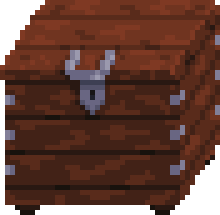
Storage Chest inventory icon.
See also: Placing objects
| Weight | 8 kg |
|---|---|
| Stack limit | 1 |
| Action cost | 1.2 AP |
| Value |  1 gold  5 silver |
| In general random treasure | No |
| Base stats can change with equipment, condition and other effects. Base weight is before crafting adjustments; final weight may differ. Merchants sell at this value and pay it for an item in full condition; wear and fuel lower the selling price. | |
How to acquire
Buying
Merchants sell it at its Value.
| Seller | Location | Availability |
|---|---|---|
| Magus Clay | Fort Solid undercroft | Story availability (spoilers). Clay trades in the Fort Solid undercroft before the explosion. He survives outside afterward but no longer offers Trade, and leaves later in his conversation sequence. |
| Viend | Fort Solid after the late-story change of trader | Story availability (spoilers). Viend is with Clay after his escort, but starts trading only after Clay leaves, you pick up Ward Breaker, and Eir announces that Viend will handle supplies. His presence or nearby alchemy workstation alone does not unlock Trade. |
Effects
Place it to get a 7 x 5 storage container. Items inside lose no durability, stay dry and never go missing.
Changed in version 0.9.0.0.
Storage containers (lowest to highest value):